01
Create your own cards
Add English, a meaning, and an optional example. Organize cards into folders and choose what to study today.
 Lockeigo
ENGLISH ON YOUR LOCK SCREEN
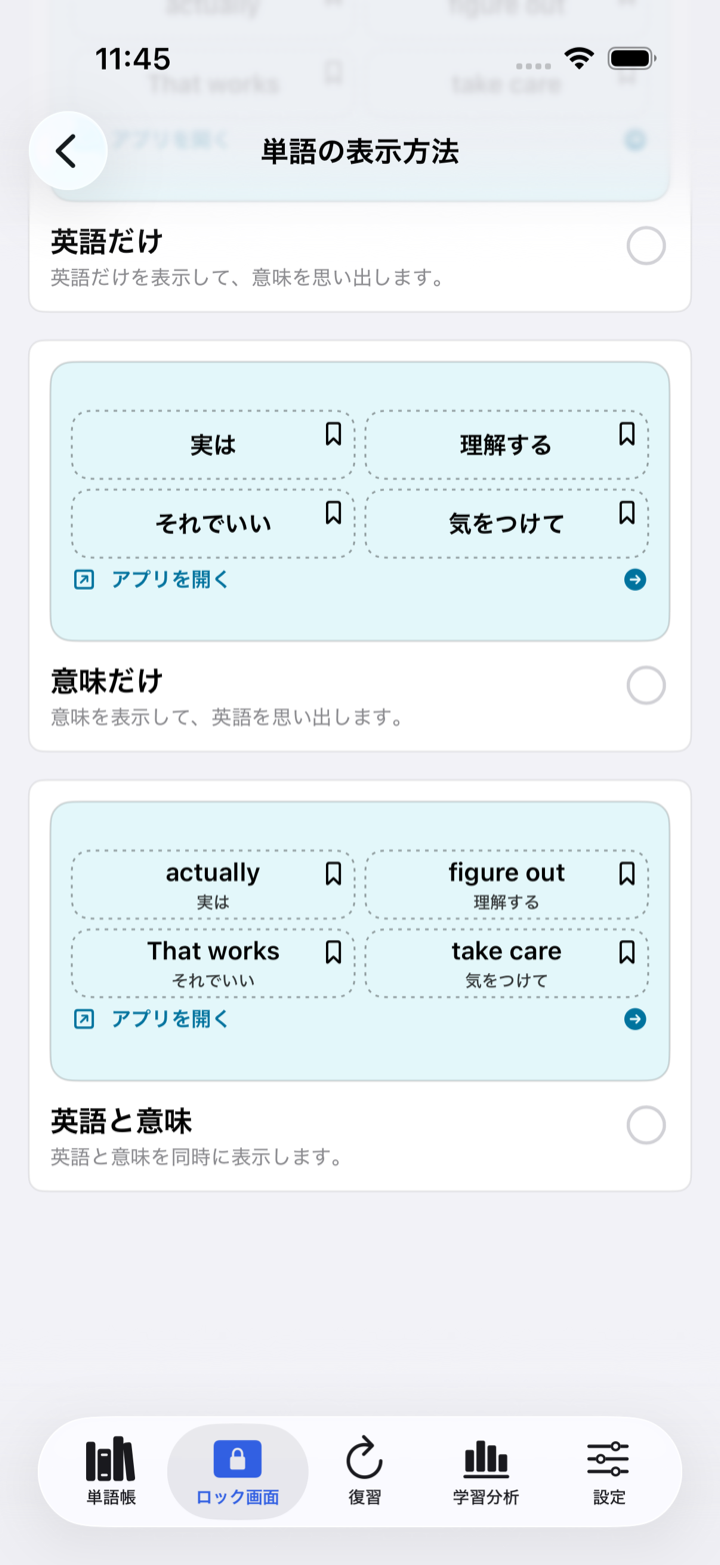
Start a Live Activity in the app and recall your own English cards from the Lock Screen. Reveal the meaning, save a card, mark it for review, or move to the next card.
LOCK SCREEN FIRST
Choose a deck, display style, theme, font, and card size. Live Activities require permission in iOS and are delivered on a best-effort basis.
Add English, a meaning, and an optional example. Organize cards into folders and choose what to study today.
Add Small or Medium Home Screen Widgets, or a rectangular Lock Screen Widget. Widgets are optional and separate from Live Activities.
Explore Widget layouts →Swipe “Again” or “Got it.” Plus adds spaced repetition, a daily plan, on-device insights, continuous speech, more designs, and higher creation limits.
PRIVATE BY DEFAULT
Cards and learning records are stored in the app’s local App Group container. If you explicitly start automatic Live Activity display, only the content and technical data needed for that display are processed briefly through Microsoft Azure and Apple Push Notification service. Free users may see ads inside the four main app tabs. Ads are never shown on the Lock Screen, in Live Activities, Dynamic Island, Widgets, notifications, or the Plus purchase and subscription-management screen.